
Too many website admins don't know how their WordPress websites are targeted by hackers.
It's no secret that WordPress is a massive target for hackers. If you've ever administrated a WordPress website or developed one, you may have become aware of how frequently WordPress websites are attacked and how expensive recovery from these events can be.
The statistics around hacks on WordPress are staggering - WordFence, a company providing supplemental security for WordPress websites, has the best data around this activity:
- In 2024, over 8,200 vulnerabilities were documented in the WordPress ecosystem.
- Only around 4% of these were WordPress itself, which is around one per day.
- The other 96% were due to various plugins and themes installed by developers.
- WordFence defended websites against Billions of attacks (!!) in 2024.
- The number of WordPress vulnerabilites and the number of attempted hacks increases every year.
- This data does not account for any WordPress websites not protected by WordFence.
WordPress powers roughly one third of the entire the internet and currently represents around 60% of all websites in purpose-built Content Management Systems. Its ease of onboarding and developer experience have created a large community of web developers who have made it a highly-recommended option for professional websites. This is one reason why it's targeted so heavily by hackers, who need only cruise a few domains to find a target for exploit. The other is that WordPress remains vulnerable to hacking, version after version, year after year.
How do Hackers know that the website is WordPress?
wp-login.php exists
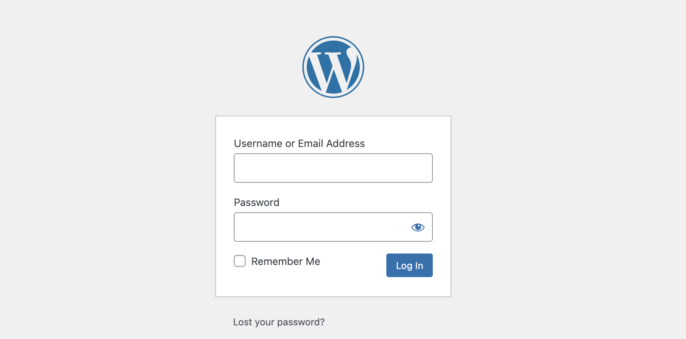
Found it! wp-login.php means that you can try to get into a WordPress website.
One way hackers know they have found a WordPress website is through the URL ending in 'wp-login.php' (or 'wp-admin' which will reroute you to 'wp-login.php' while not logged-in) which is the entry point to the WordPress control panel. While some CMS systems allow you to change the location of this page, WordPress will likely break if you try, so looking for this page is a strong indicator to determine if a domain is powered by WordPress. Upon finding this, the hacker can attempt to break in with scripted username/password combinations or attempt brute force attacks (doing this a lot at a time, causing the server to give up.) While something like WordFence may help mitigate this scenario, any unprotected WordPress website could become a target.
wp-content exists in source code
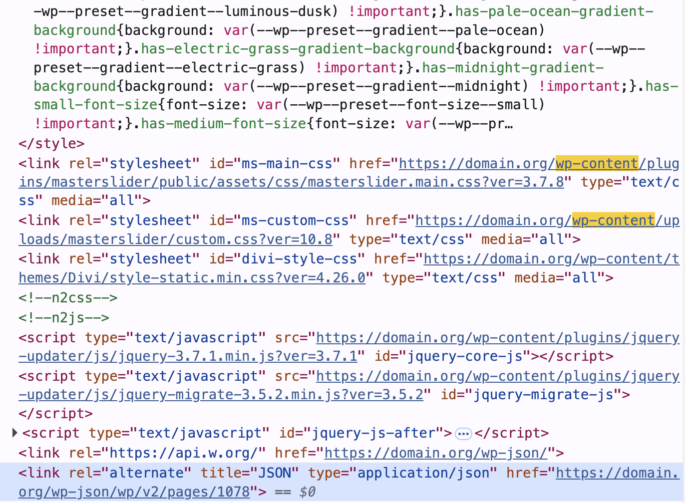
There it is! wp-content (or wp-json) means that this website is WordPress
The source code of a website is the programming that is accessed by the web browser in order to display the page. This is available in rendered format (the browser) and raw format (the actual code itself) to everyone who shows up, unless they are blocked. Hackers don't need me to know that making a list of WordPress websites is as easy as browsing the head of a page (the invisible part, generally) looking for this one phrase. Why? This is where WordPress stores all of its customizations. The website's images, downloads, and plugins all go here.
In fact, if a hacker is trying to target a theme or a plugin for exploit (as they apparently do in 96% of cases,) all they have to do is find it in the source code in order to know that they've found a potential target. And if the website hasn't updated the plugin, isn't protected by something like WordFence, or the attack vector hasn't been discovered, the website might incur what we think of as "a real problem."
The generator meta tag & RSS feeds
By default, WordPress markets itself in your page source code, announcing itself as the website's generator and providing a version number.
<meta name="generator" content="WordPress 6.4.1">
Some plugins (wp-content things) also do this:
<meta content="Divi v.4.23.1" name="generator">
Since we know that hackers scan your source code for vulnerabilities and that version releases (and compulsory software updates) sometimes known as "patches" are the way to keep your website safe, this unfortunately amounts to announcing that you are vulnerable to some attacks.
The generator tag that WordPress inserts automatically can be hidden with a little bit of code work or a plugin, but it still unfortunately outputs to your RSS feeds - and since you're probably not hiding those, hackers can still find it:
<generator>https://wordpress.org/?v=6.8.2</generator>
.. and more!
As someone who chooses to avoid working with WordPress for reasons like these, (and as not-a-hacker, obviously) these are just the ways I know to find this information about these websites. It's out there for every visitor to see. There may be other ways I don't know about to target these websites or identify them.
The situation
If your website is run on WordPress, you absolutely must keep up with security patches and updates. Even doing this won't prevent your website from being vulnerable, because hackers are coming up with brand new ways to compromise these websites all the time and successfully do so more than 22 times per second. You may not be able to avoid all attack vectors because you may be attacked before the attack type is known and patched.
What you can do
Not everybody realizes that you can have the exact same website, but without the vulnerabilities; by switching out of WordPress. The reasons why WordPress is targeted are very specific to WordPress and its internal limitations, and many Content Management Systems offer a complete vacancy of exposure where these vulnerabilities are concerned. Furthermore, some are even designed for website security, like ExpressionEngine and Craft CMS. Its one of the reasons we like working with these. For instance, you can hide the control panel entry point in both of these, while hiding wp-login.php in WordPress may cause the website not to work. And both of these support hiding plugins in multiple ways.
Unfortunately, avoiding these pitfalls means leaving WordPress behind. The good news is that once this happens, you'll never have to wake up to another website attack and the unexpected outlay of valuable worktime or rescue funds. You can still have the website you want while not dealing with this. Websites like this one.
Can we help?
We can expertly move a vulnerable website in any state to a secure, stable content management system.